지난 시간까지 Terraform(BPG Provider) 을 이용해 단 1분 만에 5대의 Rocky Linux 서버(Master 1대, Worker 4대)를 찍어내는 데 성공했습니다. SSH 키까지 자동으로 심겨 있어 비밀번호 없이 접속되는 쾌적한 환경입니다.
쿠버네티스를 설치하려면 Swap을 끄고, 방화벽을 열고, 컨테이너 런타임을 설치하는 등 복잡한 OS 설정이 필요합니다.
서버가 1대라면 직접 들어가서 하겠지만, 우리는 5대입니다. 그래서 등장하는 도구가 바로 앤서블(Ansible)입니다.
Ansible 이란?
인프라를 코드로 관리(IaC)하여, 여러 대의 서버 설정을 자동화하는 도구입니다.
앤서블의 핵심 원리: Agentless
그저 SSH(Secure Shell)만 뚫려 있으면 됩니다.
- 내 맥북(Control Node)에서 앤서블이 파이썬 코드를 생성합니다.
- 이 코드를 SSH를 통해 대상 서버(Managed Node)로 보냅니다.
- 서버에서 실행하고 결과를 가져온 뒤, 코드는 흔적도 없이 사라집니다.
이토록 가볍고 심플하기 때문에 현재 업계 표준으로 자리 잡았습니다.
1. Ansible 설치
로컬 환경은 맥북입니다.
brew install ansible

ansible --version

# 테라폼 코드와 섞이지 않게 별도의 레포지도리 생성
mkdir ansible-homelab
2. 인벤토리 작성
앤서블이 명령을 내릴 타겟 리스트(inventory.ini)를 작성합니다.
# 1. 마스터 노드 (Control Plane)
[masters]
k8s-master ansible_host=192.168.219.120

# 2. 워커 노드 (Data Plane)
[workers]
k8s-worker-1 ansible_host=192.168.219.121
k8s-worker-2 ansible_host=192.168.219.122
k8s-worker-3 ansible_host=192.168.219.123
k8s-worker-4 ansible_host=192.168.219.124

# 3. 전체 클러스터 그룹
[k8s_cluster:children]
masters
workers

# 4. 공통 접속 변수
[k8s_cluster:vars]
ansible_user=root
ansible_ssh_private_key_file=~/.ssh/id_ed25519
ansible_python_interpreter=/usr/bin/python3
3. 환경 설정
매번 호스트 키 확인 메시지가 뜨면 자동화가 끊깁니다. 홈랩 환경이므로 보안 설정을 조금 유연하게 풀어줍니다.
[defaults]
inventory = inventory.ini
host_key_checking = False
deprecation_warnings = False
4. 통신 테스트
앤서블의 ping 모듈을 사용해 5대 서버가 내 명령을 받을 준비가 되었는지 확인합니다.
ansible all -m ping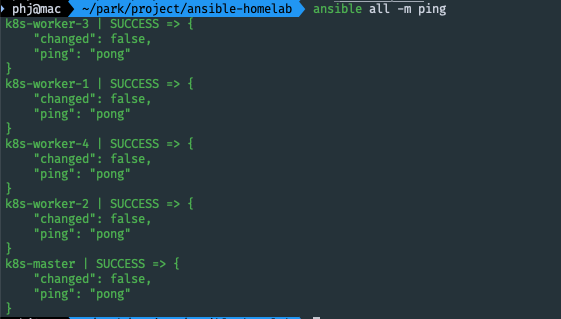
5. 플레이북 작성
작업 디렉토리(~/ansible-homelab)에 아래 5개 파일을 차례대로 생성합니다.
- k8s-common.yaml: 모든 노드 공통 설정 (OS, 런타임)
- install-k8s.yaml: 쿠버네티스 패키지 설치
- master-init.yaml: 마스터 노드 초기화 및 CNI 설치
- worker-join.yaml: 워커 노드 연결
- site.yaml: 통합 실행 파일
k8s-common.yaml
---
- name: 1. Common Configuration
  hosts: all
  become: yes
  tasks:
    # 호스트네임 설정 (k8s-master, k8s-worker-1 등)
    - name: Set hostname
      hostname:
        name: "{{ inventory_hostname }}"

    # Swap 비활성화 (필수)
    - name: Disable SWAP
      shell: |
        swapoff -a
      when: ansible_swaptotal_mb > 0

    - name: Remove SWAP from fstab
      replace:
        path: /etc/fstab
        regexp: '^([^#].*?\sswap\s+sw\s+.*)$'
        replace: '# \1'

    # 방화벽 해제 (홈랩 환경용)
    - name: Stop firewalld
      service:
        name: firewalld
        state: stopped
        enabled: no
      ignore_errors: yes

    # SELinux Permissive 모드
    - name: Set SELinux to permissive
      shell: |
        setenforce 0
        sed -i 's/^SELINUX=enforcing$/SELINUX=permissive/' /etc/selinux/config
      ignore_errors: yes

    - name: Update kernel and install extra modules
      dnf:
        name:
          - kernel
          - kernel-core
          - kernel-modules
          - kernel-modules-extra
        state: latest
      register: kernel_update

    - name: Reboot to load new kernel
      reboot:
        msg: "Rebooting to load new kernel and modules"
        pre_reboot_delay: 5
        reboot_timeout: 600
      when: kernel_update.changed

    # 커널 모듈 로드 (네트워크 브리지용)
    - name: Load kernel modules
      copy:
        dest: /etc/modules-load.d/k8s.conf
        content: |
          overlay
          br_netfilter

    - name: Modprobe modules
      shell: |
        modprobe overlay
        modprobe br_netfilter

    # 네트워크 트래픽 설정
    - name: Configure sysctl
      copy:
        dest: /etc/sysctl.d/k8s.conf
        content: |
          net.bridge.bridge-nf-call-iptables  = 1
          net.ipv4.ip_forward                 = 1
          net.bridge.bridge-nf-call-ip6tables = 1

    - name: Apply sysctl
      shell: sysctl --system

    # Containerd 설치
    - name: Add Docker repo
      shell: dnf config-manager --add-repo https://download.docker.com/linux/centos/docker-ce.repo

    - name: Install containerd
      dnf:
        name: containerd.io
        state: present

    - name: Configure containerd
      shell: |
        mkdir -p /etc/containerd
        containerd config default > /etc/containerd/config.toml
        sed -i 's/SystemdCgroup = false/SystemdCgroup = true/' /etc/containerd/config.toml

    - name: Start containerd
      service:
        name: containerd
        state: started
        enabled: yes
install-k8s.yaml
---
- name: 2. Install Kubernetes Binaries
  hosts: all
  become: yes
  tasks:
    - name: Add Kubernetes repo
      copy:
        dest: /etc/yum.repos.d/kubernetes.repo
        content: |
          [kubernetes]
          name=Kubernetes
          baseurl=https://pkgs.k8s.io/core:/stable:/v1.30/rpm/
          enabled=1
          gpgcheck=1
          gpgkey=https://pkgs.k8s.io/core:/stable:/v1.30/rpm/repodata/repomd.xml.key

    - name: Install packages
      dnf:
        name:
          - kubelet
          - kubeadm
          - kubectl
        state: present
        disable_excludes: kubernetes

    - name: Enable kubelet
      service:
        name: kubelet
        enabled: yes
master-init.yaml
---
- name: 3. Initialize Master Node
  hosts: masters
  become: yes
  tasks:
    - name: Check if cluster is initialized
      stat:
        path: /etc/kubernetes/admin.conf
      register: kube_conf

    - name: Initialize Master
      shell: |
        kubeadm init \
          --apiserver-advertise-address={{ ansible_host }} \
          --pod-network-cidr=192.168.0.0/16
      when: not kube_conf.stat.exists
      register: init_output

    - name: Create .kube directory
      file:
        path: /root/.kube
        state: directory
        mode: '0755'

    - name: Copy admin.conf
      copy:
        src: /etc/kubernetes/admin.conf
        dest: /root/.kube/config
        remote_src: yes

    - name: Install Calico CNI
      shell: kubectl apply -f https://raw.githubusercontent.com/projectcalico/calico/v3.28.0/manifests/calico.yaml
      environment:
        KUBECONFIG: /etc/kubernetes/admin.conf
      when: not kube_conf.stat.exists
worker-join.yaml
---
- name: 4.1 Generate Join Token
  hosts: masters
  become: yes
  tasks:
    - name: Get join command
      shell: kubeadm token create --print-join-command
      register: join_command_raw

    - name: Register dummy host with variable
      add_host:
        name: "K8S_TOKEN_HOLDER"
        token_cmd: "{{ join_command_raw.stdout }}"

- name: 4.2 Join Workers
  hosts: workers
  become: yes
  tasks:
    - name: Check if already joined
      stat:
        path: /etc/kubernetes/kubelet.conf
      register: kubelet_conf

    - name: Join Cluster
      shell: "{{ hostvars['K8S_TOKEN_HOLDER']['token_cmd'] }}"
      when: not kubelet_conf.stat.exists
site.yaml
---
- import_playbook: k8s-common.yaml
- import_playbook: install-k8s.yaml
- import_playbook: master-init.yaml
- import_playbook: worker-join.yaml
실행 명령어
ansible-playbook site.yml
이 명령어를 실행하고, 무수한 오류가 생겼습니다...
제일 큰 오류는 각 VM 에 커널의 추가 모듈이 없어서 계속 실패했습니다. 그래서 커널과 추가 모듈 모두 최신 버전으로 업데이트하고 재부팅 하는 작업을 추가했습니다.
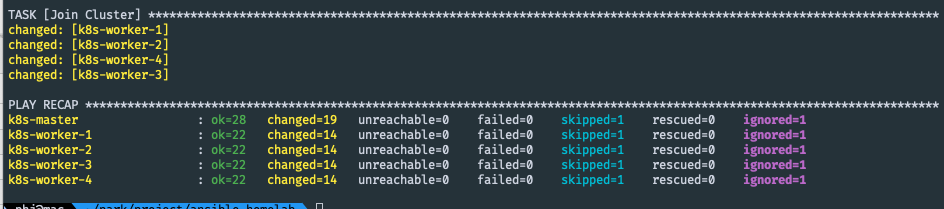
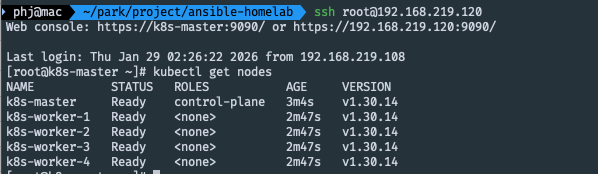
마스터 노드에 접속하여 확인해보면 잘 설치가 됐음을 확인할 수 있습니다.
'project > 본투비엔지니어' 카테고리의 다른 글
| [본투비엔지니어] 나에게 베어본만 주어진다면?? (9) (0) | 2026.01.31 |
|---|---|
| [본투비엔지니어] 나에게 베어본만 주어진다면?? (8) (0) | 2026.01.29 |
| [본투비엔지니어] 나에게 베어본만 주어진다면?? (6) (0) | 2026.01.29 |
| [본투비엔지니어] 나에게 베어본만 주어진다면?? (5) (0) | 2026.01.28 |
| [본투비엔지니어] 나에게 베어본만 주어진다면?? (4) (0) | 2026.01.27 |